
Can AI outside Naver read your official information?
ChatGPT said it could not read a Naver Smart Store product page, yet cited Pinnn when describing the brand. We examine that answer, Naver's crawling rules, and how to make a brand introduction accessible beyond its sales channel.
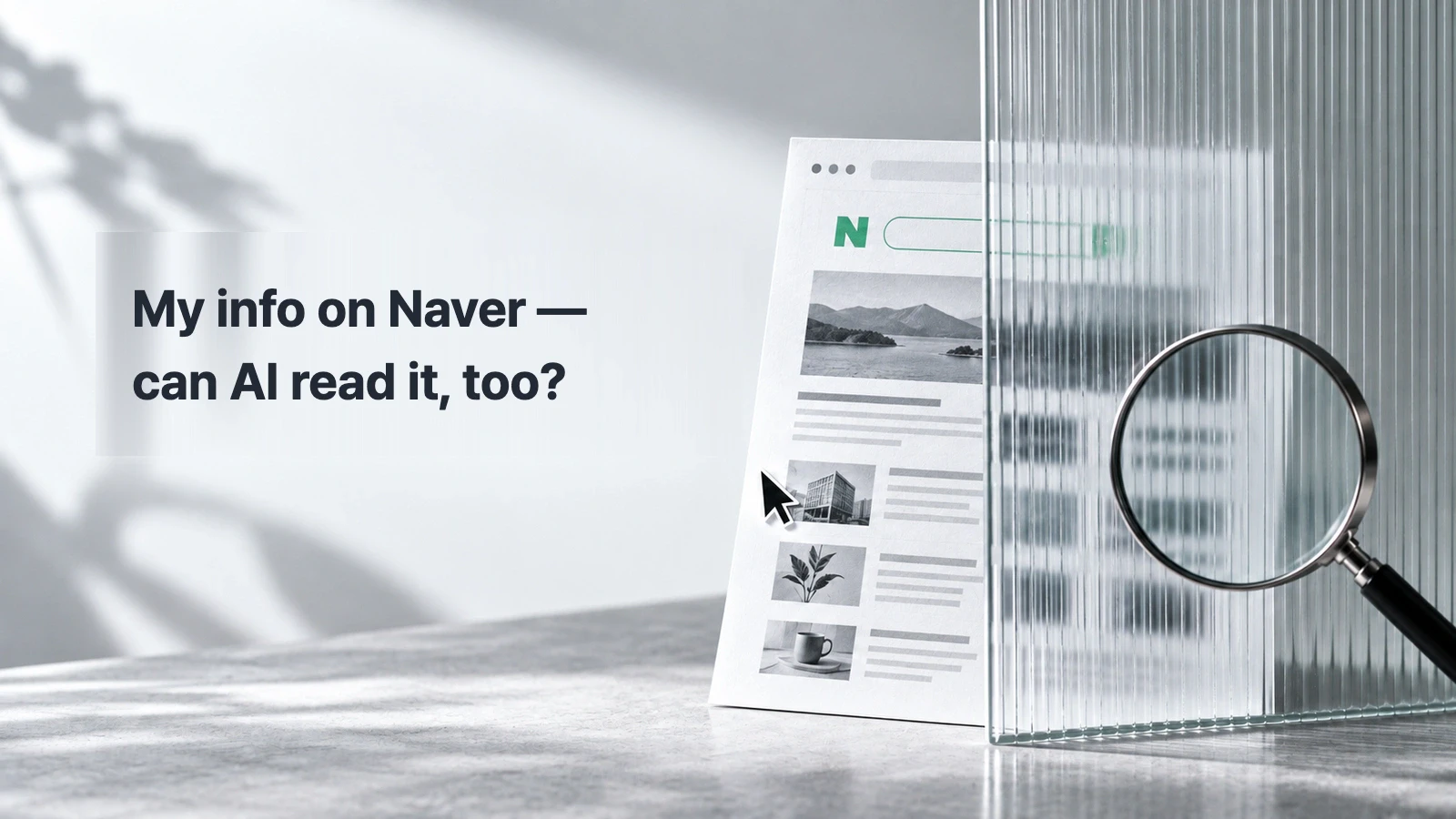
We asked ChatGPT to research a product listed on Naver Smart Store. It replied that it could not open the product page directly because of a robots.txt restriction.
In the same answer, ChatGPT described the brand's area of work and official sales channel, citing Pinnn.
Pinnn appeared in the actual answer
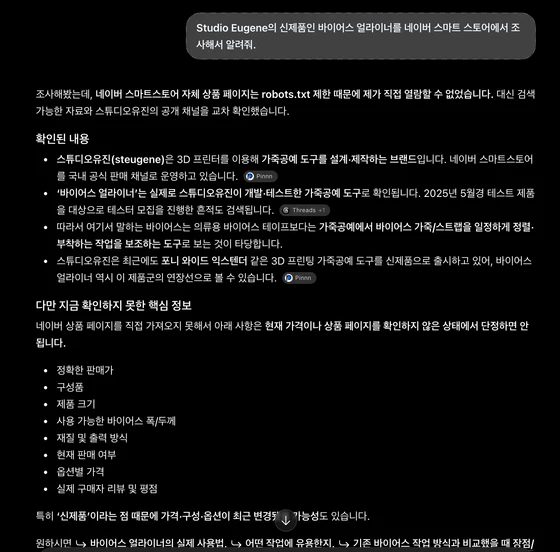
English reading guide (original Korean evidence): Question: Investigate Studio Eugene’s new Bias Aligner on Naver Smart Store. The answer says it could not directly read the product page due to robots.txt limits. It cites Pinnn for brand context, not as proof it read the original Smart Store listing.
Open the full-resolution Korean original. Historical ChatGPT screenshot in paired Naver policy posts; Pinnn citation relates to brand context, not direct Smart Store access.
The first item, which describes the brand's work and official sales channel, carries a Pinnn citation. Another item about a different product cites Pinnn as well.
Even without reading the product page, the answer used public information on Pinnn as a source for describing the brand.
The Pinnn page cited in the answer brings together a brand introduction, featured products, and official places to buy.
Visibility inside Naver is different from letting an external AI inspect your official information directly. You can keep using your Naver channels while considering where and how to publish a brand introduction for other readers.
Knowing a URL is not the same as reading its contents
Our earlier article, “AI knows your name. It does not give out your link.”, separates a name mention from a citation of an official link. Even if an answer includes the official URL, that does not prove the AI read the page behind it.
To describe a brand accurately, an AI needs to inspect what products it makes and what services it provides, not only its name and address.
Naver's search-result collection policy explains that a document a robot has not visited directly may still appear in search results because another page describes and links to it. OpenAI's bot documentation likewise says a site that blocks its search bot may still appear as a navigational link.
Publish current information that customers look for—your brand introduction, contact details, and any newly offered services—somewhere it can be read.
Restrictions observed in Blog, Smart Store, and Cafe rules
A robots.txt file tells automated crawlers which parts of a site they may access. On September 10, 2026, we opened the robots.txt files for Naver Blog, Smart Store, and Cafe and checked their rules.
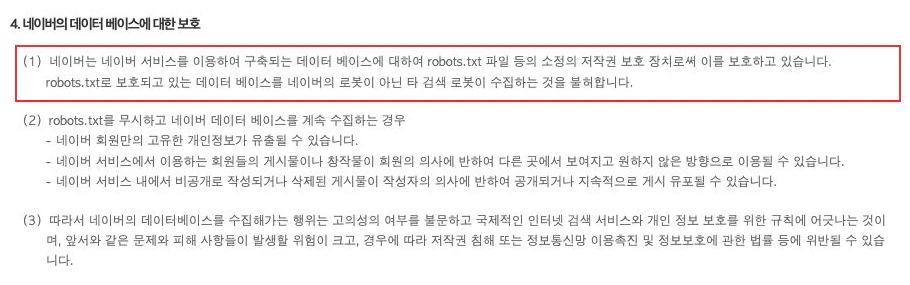
English reading guide (original Korean evidence): Unofficial translation of highlighted clause 4(1): Naver uses robots.txt and other means to protect the copyright in databases built through its services. It does not permit robots other than Naver’s to collect data from those protected databases.
Open the full-resolution Korean original. Naver collection policy §4(1) (Korean official original), https://policy.naver.com/rules/search_policy.html ; editorial English note is unofficial. Official Korean source: Naver Korean collection policy
Source: Naver search-result collection policy, section 4. The box highlights its wording about restricting external search robots. Screenshot from September 11, 2026.
Naver Blog
At the time of the check, blog.naver.com/robots.txt told the search bots OAI-SearchBot, Claude-SearchBot, and PerplexityBot not to crawl any path. GPTBot and ClaudeBot, which are associated with training, had separate rules.
Those restrictions also applied when external AI search bots tried to crawl public Naver Blog posts.
Smart Store
We observed the same full-path restriction for the three search bots in smartstore.naver.com/robots.txt. The general bot rule also restricted all paths, with an exception for facebookexternalhit.
If the only place you publish a product description is Smart Store, an external AI has just that one route to find your official explanation. Consider publishing your brand introduction and key products separately too.
Naver Cafe
cafe.naver.com/robots.txt also restricted all paths for the three search bots. It had restrictions for Googlebot and Bingbot and exceptions for some Facebook-related bots.
Training, search, and user requests are different routes
An AI can answer from information learned earlier or by looking up a web page. If you need to share up-to-date products and contact details, the web-search route matters in particular.
OpenAI documents separate controls for GPTBot, used for training, and OAI-SearchBot, used for search. A site can restrict training while allowing search crawling. ChatGPT-User visits pages in response to user requests and has another role; OpenAI says robots.txt may not apply to those requests. That route alone does not determine search visibility. See the OpenAI bot documentation.
Anthropic distinguishes ClaudeBot, Claude-SearchBot, and Claude-User too, and says these bots respect robots.txt.
“Read this Smart Store link” asks an AI to inspect a particular page. “Find a brand that makes products domestically and offers custom-order consultations” asks it to search for candidates matching those conditions. Both need concrete information and sources to support an answer.
Google AI Overviews and AI Mode should also be distinguished from the Gemini app. Google Search documentation says a page must be indexed and eligible for a snippet to be considered as a supporting link in AI Overviews or AI Mode. Google-Extended separately controls certain uses of content; it does not itself control inclusion or ranking in Google Search. See Google's crawler documentation.
Search API terms changed too
A search API is a defined way to receive search data. Alongside its web-crawling policy, Naver was changing the conditions for using data from its search APIs for AI.
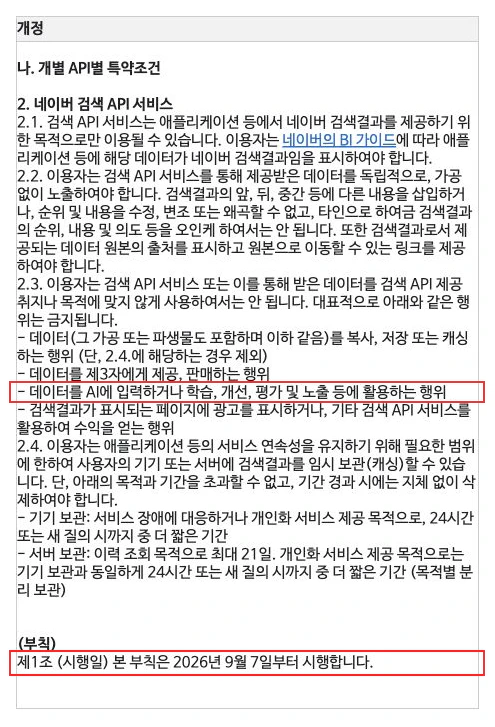
English reading guide (original Korean evidence): Unofficial translation of the highlighted restriction: Using data obtained through the Search API as input to AI, or for AI training, improvement, evaluation or exposure, is prohibited. Highlighted effective date: September 7, 2026. Not a ban on all AI web search.
Open the full-resolution Korean original. Naver Search API revised terms (Korean official original), https://developers.naver.com/products/terms/ and https://developers.naver.com/notice/article/33400 ; editorial English note is unofficial. Official Korean sources: Naver Korean Search API terms and Naver notice 33400
Source: Naver Developers notice. The screenshot highlights the AI-use restriction and September 7 effective date; it was captured on September 11, 2026.
From July 31, new applications for the Search, Search Trend, and Shopping Insight APIs through Naver Developers were stopped as part of a transition to NAVER API HUB.
From August 1, the older Naver Developers Search API stopped providing shopping, book, and academic-information data.
The revised Naver Developers Search API terms took effect on September 7. They prohibit using supplied data for AI input, training, improvement, evaluation, or display.
At publication, a comparable NAVER API HUB terms revision was scheduled to take effect on September 20.
Sources: Naver Developers notice, Naver Developers terms, and NAVER Cloud's API HUB notice.
When using a search API, check both what data it supplies and how you are allowed to use it with AI.
Naver's own AI and an RSS exception
Naver says its place-focused AI briefings analyze blog posts and visitor reviews to summarize a place's characteristics. It also says it uses blogs and partner content for travel information. See the Naver AI Briefing help page.
Under Naver's public policy, when a user has allowed their content to be published via RSS, permission to collect and search that RSS takes precedence over robots.txt. See the Naver search-result collection policy.

English reading guide (original Korean evidence): Unofficial translation of the highlighted exception: If a user permits collection via RSS, the RSS permission takes priority even when robots.txt contains a ban. Permitted content may be collected and searched via RSS. This is not a blanket permission for all data.
Open the full-resolution Korean original. Naver RSS/robots exception (Korean official original), https://policy.naver.com/rules/search_policy.html ; editorial English note is unofficial. Official Korean source: Naver Korean collection policy
Source: Naver search-result collection policy, section 4, showing the RSS collection and search exception for content its owner has chosen to make public. Screenshot from September 11, 2026.
Naver operates its collection policy to protect personal information and creative works.
Keep selling on Smart Store; introduce yourself elsewhere too
ChatGPT could not read the Smart Store product page in the example, but it used public information on Pinnn to describe the brand. There was another readable page for the introduction, separate from the sales channel.
You can continue selling and talking with customers on your existing Naver channels. Add a public page with your brand introduction, featured products, and official places to buy, and people and AI systems have another place to check the information.
For example, a customer looking for “a domestically made brand that uses a particular material and offers custom-order consultations” needs more than a store URL. They need to know how you make things, which materials you use, and whether consultations are available. Put that in your introduction and connect a contact channel so the customer can check the fit before buying or inquiring.
Write your introduction and answers to frequent questions as text. Google Search documentation also recommends making important content available in textual form.
Pinnn can bring that introduction and your official channels together on one page. You can list the brand name, specialty, key product lines, service area, and contact channel, then link your Smart Store, blog, and social accounts. Keep the details up to date.
Start with your brand introduction and official channels on Pinnn. Keep selling on Smart Store while making the introduction available outside Naver too.
Sources
- 네이버 검색결과 수집 정책 — policy.naver.com
- OpenAI 봇 문서 — developers.openai.com
- blog.naver.com/robots.txt — blog.naver.com
- smartstore.naver.com/robots.txt — smartstore.naver.com
- cafe.naver.com/robots.txt — cafe.naver.com
- Anthropic의 안내 — support.claude.com
- Google 검색 문서 — developers.google.com
- Google 크롤러 문서 — developers.google.com
- 개발자센터 공지 — developers.naver.com
- 개발자센터 이용약관 — developers.naver.com
- NAVER Cloud의 API HUB 약관 개정 공지 — www.ncloud.com
- 네이버 AI 브리핑 도움말 — help.naver.com
- ChatGPT 답변에 인용된 Pinnn 페이지 — Pinnn
More guides
Put these ideas into practice.
Bring your bio and official channels together on a Pinpage.